-
[AI Agent] Agent와 LangChain AgentExecutor (+ ToolFormer, ReAct, CodeAct Agent)AI/NLP 2025. 5. 24. 11:56728x90
[AI Agent] Agent와 LangChain AgentExecutor (+ ToolFormer, ReAct, CodeAct Agent)
Agent란?
- 에이전트는 사전에 정의된 규칙이나 명시적인 프로그래밍 없이도 스스로 결정을 내리고 행동
- 구성
- AI Model
- Capabilities and Tools
- 구성
- LangChain에서 에이전트는 다음과 같은 구성요소로 이루어져 있습니다:
- Agent: 의사 결정을 담당하는 핵심 컴포넌트입니다.
- Tools: 에이전트가 사용할 수 있는 기능들의 집합입니다.
- Toolkits: 관련된 도구들의 그룹입니다.
- AgentExecutor: 에이전트의 실행을 관리하는 컴포넌트입니다.
(1) Tool & Tool Binding
- Tool이 가져야 하는 것
- 함수가 수행하는 작업에 대한 텍스트 설명
- Arguments with typings
- (Optional) Outputs with typings
- Tool 실행 방법
- LLM에게 툴의 존재에 대해 가르치고 필요할 때 텍스트 기반 호출을 생성하도록 지시하
- LLM은 call weather_tool('Paris')와 같은 도구 호출을 나타내는 텍스트를 생성하도록 함
- 에이전트는 이 응답을 읽고, 툴 호출이 필요한지 식별하고, LLM을 대신하여 툴을 실행
- Tool 주는 방법
- system prompt을 통해
In [ ]:import re import requests from bs4 import BeautifulSoup from langchain.agents import tool # 도구를 정의합니다. @tool def get_word_length(word: str) -> int: """Returns the length of a word.""" return len(word) @tool def add_function(a: float, b: float) -> float: """Adds two numbers together.""" return a + b @tool def naver_news_crawl(news_url: str) -> str: """Crawls a 네이버 (naver.com) news article and returns the body content.""" # HTTP GET 요청 보내기 response = requests.get(news_url) # 요청이 성공했는지 확인 if response.status_code == 200: # BeautifulSoup을 사용하여 HTML 파싱 soup = BeautifulSoup(response.text, "html.parser") # 원하는 정보 추출 title = soup.find("h2", id="title_area").get_text() content = soup.find("div", id="contents").get_text() cleaned_title = re.sub(r"\n{2,}", "\n", title) cleaned_content = re.sub(r"\n{2,}", "\n", content) else: print(f"HTTP 요청 실패. 응답 코드: {response.status_code}") return f"{cleaned_title}\n{cleaned_content}" tools = [get_word_length, add_function, naver_news_crawl]In [ ]:from langchain_openai import ChatOpenAI # 모델 생성 llm = ChatOpenAI(model="gpt-4o-mini", temperature=0, api_key="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") # 도구 바인딩 llm_with_tools = llm.bind_tools(tools)In [ ]:llm_with_tools.invoke("What is the length of the word '바보'?").tool_callsIn [ ]:from langchain_core.output_parsers.openai_tools import JsonOutputToolsParser # 도구 바인딩 + 도구 파서 chain = llm_with_tools | JsonOutputToolsParser(tools=tools) # 실행 결과 tool_call_results = chain.invoke("What is the length of the word '바보'?")In [ ]:print(tool_call_results, end="\n\n==========\n\n") # 첫 번째 도구 호출 결과 single_result = tool_call_results[0] # 도구 이름 print(single_result["type"]) # 도구 인자 print(single_result["args"])- 위와 같이 llm_with_tools 와 JsonOutputToolsParser 를 연결하여 tool_calls 를 parsing 하여 결과를 확인
- chain에 function calling하는 함수를 추가해준다면 function까지 자동 실행
In [ ]:def execute_tool_calls(tool_call_results): """ 도구 호출 결과를 실행하는 함수 :param tool_call_results: 도구 호출 결과 리스트 :param tools: 사용 가능한 도구 리스트 """ # 도구 호출 결과 리스트를 순회합니다. for tool_call_result in tool_call_results: # 도구의 이름과 인자를 추출합니다. tool_name = tool_call_result["type"] tool_args = tool_call_result["args"] # 도구 이름과 일치하는 도구를 찾아 실행합니다. # next() 함수를 사용하여 일치하는 첫 번째 도구를 찾습니다. matching_tool = next((tool for tool in tools if tool.name == tool_name), None) if matching_tool: # 일치하는 도구를 찾았다면 해당 도구를 실행합니다. result = matching_tool.invoke(tool_args) # 실행 결과를 출력합니다. print(f"[실행도구] {tool_name}\n[실행결과] {result}") else: # 일치하는 도구를 찾지 못했다면 경고 메시지를 출력합니다. print(f"경고: {tool_name}에 해당하는 도구를 찾을 수 없습니다.") chain = llm_with_tools | JsonOutputToolsParser(tools=tools) | execute_tool_calls chain.invoke("What is the length of the word '바보'?")(2) Agent와 AgentExecutor
- AI 에이전트 워크플로(AI Agent Workflow) - Thought-Action-Observation
- Thought: The LLM part of the Agent decides what the next step should be.
- Internal Reasoning
- Updated thought
- 반영: Reflecting
- 최종 조치 Final Action
- Action: The agent takes an action, by calling the tools with the associated arguments.
- Tool Usage
- Observation: The model reflects on the response from the tool.
- Feedback from the Environment:
- This observation is then added to the prompt as additional context
- Feedback from the Environment:
- Thought: The LLM part of the Agent decides what the next step should be.
- tool을 선택하는 llm를 구현하는 방법
- 방법 1) 위처럼 ChatOpenAI()에 .bind_tools 직접 하고 invoke할 수도 있지만, [ChatOpenAI().bind_tools() + .invoke()]
- → "툴을 사용할 수 있는 LLM"을 만들고 직접 호출
- 구조: ChatOpenAI 모델에 tools 정보를 바인딩해서 툴 콜링 가능한 LLM 객체를 생성.
- 역할: tool 호출은 가능하지만, 멀티스텝 추론, 결정적 워크플로우, 에이전트 실행 로직 없음
- 방법 2) LangChain에서 제공하는 Agent 형태로 불러올 수 있음 !! (예를 들어 create_tool_calling_agent() + agent_executor.invoke()를 통해서, 종류는 여기)
- → "툴 사용 포함 추론을 관리하는 에이전트"를 구성하고 실행
- 구조: LLM + 툴 + 추론 관리 체계를 갖춘 LangChain Agent 생성
- 역할: 툴 사용 여부 판단 → 툴 호출 → 결과 반영하여 최종 응답 생성까지 전체 흐름 관리
- 다중 툴, 조건부 사용, 반복 툴 호출 등 복잡한 시나리오 대응 가능
- 방법 1) 위처럼 ChatOpenAI()에 .bind_tools 직접 하고 invoke할 수도 있지만, [ChatOpenAI().bind_tools() + .invoke()]
In [ ]:import re import requests from bs4 import BeautifulSoup from langchain.agents import tool # 도구를 정의합니다. @tool def get_word_length(word: str) -> int: """Returns the length of a word.""" return len(word) @tool def add_function(a: float, b: float) -> float: """Adds two numbers together.""" return a + b @tool def naver_news_crawl(news_url: str) -> str: """Crawls a 네이버 (naver.com) news article and returns the body content.""" # HTTP GET 요청 보내기 response = requests.get(news_url) # 요청이 성공했는지 확인 if response.status_code == 200: # BeautifulSoup을 사용하여 HTML 파싱 soup = BeautifulSoup(response.text, "html.parser") # 원하는 정보 추출 title = soup.find("h2", id="title_area").get_text() content = soup.find("div", id="contents").get_text() cleaned_title = re.sub(r"\n{2,}", "\n", title) cleaned_content = re.sub(r"\n{2,}", "\n", content) else: print(f"HTTP 요청 실패. 응답 코드: {response.status_code}") return f"{cleaned_title}\n{cleaned_content}" one_tool = [get_word_length] tools = [get_word_length, add_function, naver_news_crawl][1] 톺아보기
- 방법 1
- ChatOpenAI().bind_tools() 하면 출력되는 RunnableBinding
- ✅ RunnableBinding은 LLM과 함께 사용하는 함수들 (tool definitions) 을 LLM에 묶어서 실행하는 Runnable입니다.
- LLM + tools → 묶어서 하나의 실행 단위로 만든 것 = RunnableBinding
- 내부 정의 및 동작 과정
class RunnableBinding(Runnable): def __init__(self, bound, kwargs): self.bound = bound # LLM 등 Runnable self.kwargs = kwargs # tools 같은 추가 매개변수- RunnableBinding.invoke(input)이 호출되면 bound에 kwargs를 바인딩해서 새로운 Runnable을 만듦
- 그 새 runnable에 input을 넘겨 실행
- 특징
- → "툴을 사용할 수 있는 LLM"을 만들고 직접 호출
- 구조: ChatOpenAI 모델에 tools 정보를 바인딩해서 툴 콜링 가능한 LLM 객체를 생성.
- 역할: tool 호출은 가능하지만, 멀티스텝 추론, 결정적 워크플로우, 에이전트 실행 로직 없음
- ChatOpenAI().bind_tools() 하면 출력되는 RunnableBinding
In [ ]:llm_OpenAI = ChatOpenAI(model="gpt-4-turbo", api_key='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', temperature=0) llm_OpenAIIn [ ]:llm_OpenAI.bind_tools(tools)- 방법 2
- Agent + AgentExecutor
- Agent :
- 구성
- RunnableAssign → ChatPromptTemplate → RunnableBinding으로 묶인 ChatOpenAI(model+tools) → ToolsAgentOutputParser
- RunnableAssign : 메시지 전처리나 구성 요소 재조합을 위한 유틸 체인 - RunnableAssign(mapper={...}): 특정 key를 추가하는 역할 - 여기선 agent_scratchpad를 추가함 - 지금까지 agent가 호출한 Tool들의 이력과 결과를 텍스트 형태로 정리해, 다음 프롬프트에 다시 포함시키는 용도 - RunnableLambda(...): lambda 함수로 직접 가공 - 이 경우엔 message_formatter를 통해 intermediate_steps를 포맷팅하여 agent_scratchpad로 넘김 - intermediate_steps은 이전 툴 호출 기록
- RunnableAssign → ChatPromptTemplate → RunnableBinding으로 묶인 ChatOpenAI(model+tools) → ToolsAgentOutputParser
-
RunnableAssign(mapper={ agent_scratchpad: RunnableLambda(lambda x: format_log_to_str(x['intermediate_steps'])) }) | PromptTemplate(input_variables=['agent_scratchpad', 'input'], input_types={}, partial_variables={'tools': 'get_word_length(word: str) -> int - Returns the length of a word.\nadd_function(a: float, b: float) -> float - Adds two numbers together.\nnaver_news_crawl(news_url: str) -> str - Crawls a 네이버 (naver.com) news article and returns the body content.', 'tool_names': 'get_word_length, add_function, naver_news_crawl'}, metadata={'lc_hub_owner': 'hwchase17', 'lc_hub_repo': 'react', 'lc_hub_commit_hash': 'd15fe3c426f1c4b3f37c9198853e4a86e20c425ca7f4752ec0c9b0e97ca7ea4d'}, template='Answer the following questions as best you can. You have access to the following tools:\n\n{tools}\n\nUse the following format:\n\nQuestion: the input question you must answer\nThought: you should always think about what to do\nAction: the action to take, should be one of [{tool_names}]\nAction Input: the input to the action\nObservation: the result of the action\n... (this Thought/Action/Action Input/Observation can repeat N times)\nThought: I now know the final answer\nFinal Answer: the final answer to the original input question\n\nBegin!\n\nQuestion: {input}\nThought:{agent_scratchpad}') | RunnableBinding(bound=ChatOpenAI(client=<openai.resources.chat.completions.completions.Completions object at 0x7f3077271870>, async_client=<openai.resources.chat.completions.completions.AsyncCompletions object at 0x7f3077240610>, root_client=<openai.OpenAI object at 0x7f3077287580>, root_async_client=<openai.AsyncOpenAI object at 0x7f30772718d0>, model_name='gpt-4-turbo', temperature=0.0, model_kwargs={}, openai_api_key=SecretStr('**********')), kwargs={'stop': ['\nObservation']}, config={}, config_factories=[]) | ReActSingleInputOutputParser() - 종류
- LangChain Agent에서도 주로 create_react_agent()와 create_tool_calling_agent()를 통해 만들어지는 agent를 가장 대표적으로 씀
- create_react_agent() : ReAct prompting을 사용하는 agent를 만든다 (하지만 Multi-Input tool 불가능 ㅇㅇ) - Intended Model Type : LLM - Supports Chat History : O - Supports Multi-Input Tools : X - Supports Parallel Function Calling : X
- create_tool_calling_agent(): 모델이 하나 이상의 도구(tool)를 호출해야 할 상황을 감지하고, 그 도구에 전달할 입력값들을 구조화된 형태(예: JSON)로 응답할 수 있도록 하는 기능 - 25.05.08 현재까지 아래의 세 가지 기능 모두 지원하는 유일한 agent
- Intended Model Type : Chat - Supports Chat History : O - Supports Multi-Input Tools : O - Supports Parallel Function Calling : O
- LangChain Agent에서도 주로 create_react_agent()와 create_tool_calling_agent()를 통해 만들어지는 agent를 가장 대표적으로 씀
- 구성
- AgentExecutor : Agent와 Tool을 실행해주는 메인 컨트롤러
- 내부 루프invoke() → iterate() → 내부 루프: plan() → execute_tool() → 결과 전달 → plan()... until AgentFinish
- 주요 인자
- agent: 실행 루프의 각 단계에서 계획을 생성하고 행동을 결정하는 에이전트
- tools: 에이전트가 사용할 수 있는 유효한 도구 목록
- return_intermediate_steps: 최종 출력과 함께 에이전트의 중간 단계 경로를 반환할지 여부
- max_iterations: 실행 루프를 종료하기 전 최대 단계 수
- early_stopping_method: 에이전트가 AgentFinish를 반환하지 않을 때 사용할 조기 종료 방법. ("force" or "generate")
- Agent :
- Agent + AgentExecutor
In [ ]:# 1. `create_react_agent()` 방식 # - prompt를 보면 위에서 언급한 방식처럼 Thought, Action, Observation, Thought의 반복으로 이뤄짐을 알 수 있다 # - 논문 : https://arxiv.org/abs/2210.03629 from langchain import hub prompt = hub.pull("hwchase17/react") prompt.pretty_print()In [ ]:from langchain_openai import ChatOpenAI from langchain.agents import create_react_agent # Choose the LLM to use llm = ChatOpenAI(model="gpt-4-turbo", api_key='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', temperature=0) # Construct the ReAct agent agent = create_react_agent(llm, tools, prompt) agent # ReActSingleInputOutputParser인 거 보면 위 설명대로 multi input tool들은 처리하지 못하는 것을 확인할 수 있다In [ ]:from langchain.agents import AgentExecutor # Create an agent executor by passing in the agent and tools agent_executor = AgentExecutor(agent=agent, tools=tools, verbose=True) agent_executorIn [ ]:tool_prompt = hub.pull("hwchase17/openai-tools-agent") tool_prompt.pretty_print()In [ ]:from langchain.agents import create_tool_calling_agent tool_agent = create_tool_calling_agent(llm_OpenAI, tools, prompt) tool_agent # 위의 create_react_agent와 output_parser 부분이 다르다 아마 json 형식으로 반환받겠지In [ ]:tool_agent_executor = AgentExecutor(agent=tool_agent, tools=tools, verbose=True) tool_agent_executor[2] 예제
In [ ]:from langchain.tools import tool from typing import List, Dict, Annotated from langchain_experimental.utilities import PythonREPL import requests from bs4 import BeautifulSoup from typing import List, Dict class GoogleNews: def __init__(self): self.base_url = "https://news.google.com" def search_by_keyword(self, query: str, k: int = 5) -> List[Dict[str, str]]: """구글 뉴스에서 query로 검색 후, 상위 k개의 뉴스 제목과 링크 반환""" search_url = f"{self.base_url}/search?q={query}" headers = {"User-Agent": "Mozilla/5.0"} response = requests.get(search_url, headers=headers) if response.status_code != 200: return [{"title": "뉴스 검색 실패", "url": search_url}] soup = BeautifulSoup(response.text, "html.parser") article_links = soup.select("article h3 a")[:k] results = [] for a in article_links: title = a.get_text(strip=True) href = a.get("href", "") url = self.base_url + href[1:] if href.startswith(".") else href results.append({"title": title, "url": url}) return results # 도구 생성 @tool def search_news(query: str) -> List[Dict[str, str]]: """Search Google News by input keyword""" news_tool = GoogleNews() return news_tool.search_by_keyword(query, k=5) # 도구 생성 @tool def python_repl_tool( code: Annotated[str, "The python code to execute to generate your chart."], ): """Use this to execute python code. If you want to see the output of a value, you should print it out with `print(...)`. This is visible to the user.""" result = "" try: result = PythonREPL().run(code) except BaseException as e: print(f"Failed to execute. Error: {repr(e)}") finally: return result print(f"도구 이름: {search_news.name}") print(f"도구 설명: {search_news.description}") print(f"도구 이름: {python_repl_tool.name}") print(f"도구 설명: {python_repl_tool.description}")In [ ]:# tools 정의 tools = [search_news, python_repl_tool]In [ ]:from langchain_core.prompts import ChatPromptTemplate # 프롬프트 생성 # 프롬프트는 에이전트에게 모델이 수행할 작업을 설명하는 텍스트를 제공합니다. (도구의 이름과 역할을 입력) prompt = ChatPromptTemplate.from_messages( [ ( "system", "You are a helpful assistant. " "Make sure to use the `search_news` tool for searching keyword related news.", ), ("placeholder", "{chat_history}"), ("human", "{input}"), ("placeholder", "{agent_scratchpad}"), ] )In [ ]:from langchain_openai import ChatOpenAI from langchain.agents import create_tool_calling_agent # LLM 정의 llm = ChatOpenAI(model="gpt-4o-mini", temperature=0) # Agent 생성 agent = create_tool_calling_agent(llm, tools, prompt)In [ ]:from langchain.agents import AgentExecutor # AgentExecutor 생성 agent_executor = AgentExecutor( agent=agent, tools=tools, verbose=True, max_iterations=10, max_execution_time=10, handle_parsing_errors=True, ) # AgentExecutor 실행 result = agent_executor.invoke({"input": "AI 투자와 관련된 뉴스를 검색해 주세요."}) print("Agent 실행 결과:") print(result["output"])
🔧 1. Toolformer (Meta AI, 2023)
✅ 개요
- 목표: LLM이 스스로 외부 도구(계산기, 검색기 등)를 "언제", "어떻게" 사용할지를 학습하는 방식 제안
- 핵심 기법: Self-supervised data generation
- 모델이 도구 API를 호출할 만한 위치를 예측하고, 호출 결과를 포함한 데이터를 자동 생성
✅ 주요 특징
- 기존 LLM을 추가 학습 없이 미세 조정만으로 도구 사용 능력 부여
- 도구 사용을 위한 데이터 자동 생성 파이프라인 제시
- 사용된 도구 예시: 계산기, 위키백과 검색, 번역기 등
✅ 작동 방식
- 입력 문장에 대해 LLM이 도구가 필요할 법한 위치 예측
- 해당 위치에 도구 호출 삽입 → API 결과 획득
- 이를 포함한 데이터를 fine-tuning에 사용
🧠 2. ReAct Agent (Google, 2022)
✅ 개요
- ReAct = Reasoning + Acting
- LLM이 **추론(thinking)**과 **행동(action)**을 번갈아가며 수행하게 하는 prompting 전략
- 체계적 문제 해결, 도구 사용, 인터랙션 기반 작업에 적합
✅ 주요 특징
- LLM이 "생각하고(Thought)", "행동하고(Action)", 다시 "관찰(Observation)"하는 루프를 통해 문제 해결
- 도구 사용은 프롬프트를 통해 이루어짐 (예: 검색, 계산 등)
✅ 작동 예시
vbnet복사편집Question: What’s the capital of the country where the Eiffel Tower is? Thought: Eiffel Tower is in Paris, which is in France. Action: Lookup[capital of France] Observation: Capital of France is Paris. Answer: Paris.
💻 3. CodeAct Agent (Inspired by ReAct + Toolformer)
✅ 개요
- ReAct + Code Execution 기반 Agent
- LLM이 직접 코드 스니펫을 작성하고 실행하면서 문제를 해결
- CodeAct는 일반 ReAct Agent보다 더 능동적이고 정밀한 작업 수행이 가능
✅ 주요 특징
- Thought → Code → Observation → Answer 루프
- 사용자가 의도한 결과를 얻기 위해 직접 Python 코드를 생성하여 실행 (ex. 그래프 그리기, 계산, 정렬)
✅ 작동 흐름
- 질문 입력: 사용자 질의 입력
- Thought: 어떻게 해결할지 사고
- Action (Code): Python 코드 생성
- Observation: 실행 결과 확인
- Answer: 최종 응답 반환
📊 요약 비교표
항목ToolformerReAct AgentCodeAct Agent등장 시기 2023 (Meta) 2022 (Google) 이후 등장, ReAct + 실행능력 기반 주요 목적 LLM의 도구 사용 학습 Reasoning + Acting loop LLM의 코드 실행 기반 문제 해결 학습 방식 Self-supervised fine-tuning Prompt engineering Prompt + 외부 실행 환경 도구 호출 방식 사전 학습된 API 호출 삽입 프롬프트 내 Action 명시 Python 코드 생성 후 실행 특징 데이터 자동 생성으로 도구 학습 인간처럼 단계별 추론 및 도구 사용 가능 실행 가능한 코드로 복잡한 문제 해결 가능 예시 도구 계산기, 검색기 등 검색, 계산, 위키피디아 등 matplotlib, numpy, pandas 등 실제 라이브러리
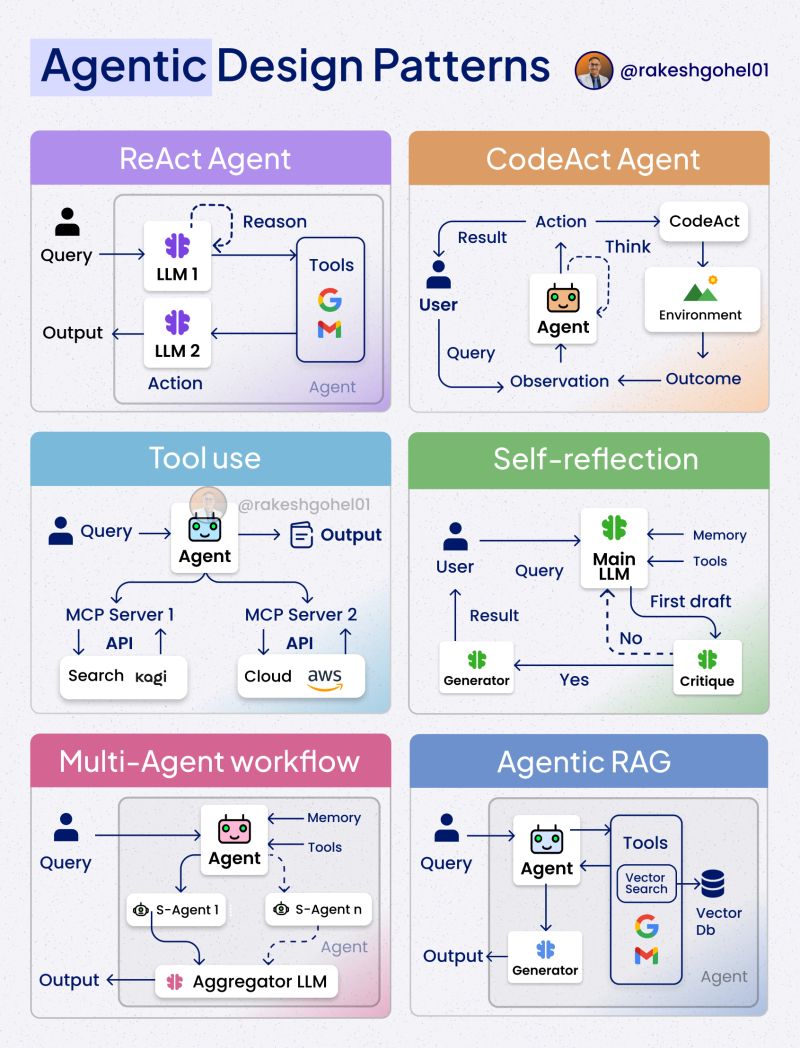
📌 ReACT (Reasoning and Acting)
a. LLM1 - 추론 (Reasoning):
입력을 해석하고 필요한 API(도구)를 활용하여 문맥을 이해하고 추론하는 단계입니다.b. LLM2 - 행동 (Actions):
API로부터 얻은 정보를 바탕으로 실제로 행동(실행)을 수행하는 단계입니다.🔗 Langchain으로 ReACT 체험하기: https://lnkd.in/gq6xi7-7
📌 CodeACT
- 코드와 상호작용하고 추론하는 새로운 방식으로, Manus AI의 에이전트들이 활용하고 있습니다.
- 사용자 시작(User Initiation):
사용자가 자연어로 에이전트에게 지시를 내립니다. - 에이전트 계획(Agent Planning):
에이전트는 이전 관찰 결과를 바탕으로 추론하여 행동 계획을 수립합니다. - CodeAct 실행(CodeAct Action):
에이전트가 실행 가능한 Python 코드를 생성하고 환경에 전달합니다. - 환경 피드백(Environment Feedback):
코드가 실행된 후 결과나 오류를 통해 에이전트는 행동을 조정합니다.
🔗 Langgraph로 CodeAct 체험하기: https://lnkd.in/gfWSUdbq
📌 Tool Use (도구 사용)
- 기존의 API별 도구 호출 방식과 달리, MCP는 AI 에이전트의 도구 호출 방식을 혁신적으로 개선했습니다.
📎 MCP에 대한 자세한 내용: https://lnkd.in/g8QvUDvU
🔗 Langchain으로 MCP 사용해보기: https://lnkd.in/gKeBhhGi
📌 Self-reflection / Reflexion (자기 성찰형 에이전트)
a. 메인 LLM:
기본적인 도구 사용 및 메모리 기능을 바탕으로 간단한 에이전트 작업을 수행합니다.b. 비평 LLM:
메인 LLM의 성능을 모니터링하고 평가하는 1개 이상의 판사 역할 LLM입니다.c. 생성기 (Generator):
비평 LLM의 정보를 기반으로 최종 답변을 생성합니다.🔗 Langchain으로 Reflexion 체험하기: https://lnkd.in/g3P4Xu3Z
📌 Multi-agent workflow (다중 에이전트 워크플로우)
a. 메인 에이전트:
서브 에이전트들을 지휘하며 도구 사용 및 메모리 기능을 활용합니다.b. 서브 에이전트들:
각각 특정 도구에 특화된 역할을 가진 전문화된 에이전트입니다.c. 결정 통합:
서브 에이전트들의 응답을 종합하여 출력 방향을 정렬하고 최종 응답을 생성합니다.🔗 Langchain으로 Multi-Agent Workflow 체험하기: https://lnkd.in/g_eQvgnp
📌 Agentic RAG (에이전트 기반 RAG)
a. 도구 사용:
웹 기반 검색 및 벡터 검색 프로토콜을 활용하여 필요한 문서를 식별합니다.
최종적으로는 하이브리드 검색을 사용하여 올바른 정보를 찾아냅니다.b. 메인 에이전트:
수집된 정보를 모델의 추론 능력과 결합하여 원하는 출력물을 생성합니다.c. 결정:
Generator LLM이 최종 결과를 생성하고 출력합니다.728x90'AI > NLP' 카테고리의 다른 글
AI Agent Architectures (2) 2025.06.15 [AI Agent] LangChain/LangGraph invoke()와 stream() (+ 그리고 How to stream tool calls) (0) 2025.05.24 [AI Agent] LangChain Expression Language(LCEL) (0) 2025.05.24 [멀티노드 분산학습] FSDP + Accelerate로 Multi Node Training하기 (0) 2025.05.24 [Team Seminar] Why do LLMs attend to the first token? (0) 2025.05.10 - 에이전트는 사전에 정의된 규칙이나 명시적인 프로그래밍 없이도 스스로 결정을 내리고 행동